For couples planning their own wedding · Web planner with print-ready PDFs

The five-list problem: one guest, five places to update, and a seating chart that falls behind with every RSVP.

The Vowcadence Wedding Planner gives each guest one Master Guest Record. RSVPs, meal counts, the seating chart and the escort cards are all built from it, so one change reaches every one of them. And the chart warns you when two people who shouldn't sit together land at the same table.

The video runs on a sample wedding with made-up guests. One reply comes in, and the meal count, the seating chart and the escort cards follow it.

Web planner and PDFs. Your sign-in link arrives by email after checkout.

Before: one reply, five places to fix

It's a weeknight in March, and a reply card is on the counter. Your cousin Dana is coming after all. She's bringing a plus-one, and they'd both like the vegetarian plate.

That one card has five places to go.

  1. The guest list: add the plus-one.
  2. The RSVP count: two more yeses.
  3. The meal count: two more vegetarian plates for the caterer.
  4. The seating chart: two seats at a table that may already be full.
  5. The escort cards: two more names to letter and file.

Miss one, and the caterer works from last week's number, or someone arrives and can't find a card with their name on it. Then the next reply comes in, and the five places get a little further apart.

None of this means you're bad at planning. When the lists live on separate sheets or separate pages, the same person ends up written down five times, and five copies of the same thing tend to drift apart. Even a spreadsheet with one row per guest usually stops at the seating chart: the chart, the escort cards and the caterer's count by table get made somewhere else, from a copy.

The seating chart has one more layer. Every family has its own short list of people who shouldn't share a table. That list lives in your head, and a chart on paper can't check it for you.
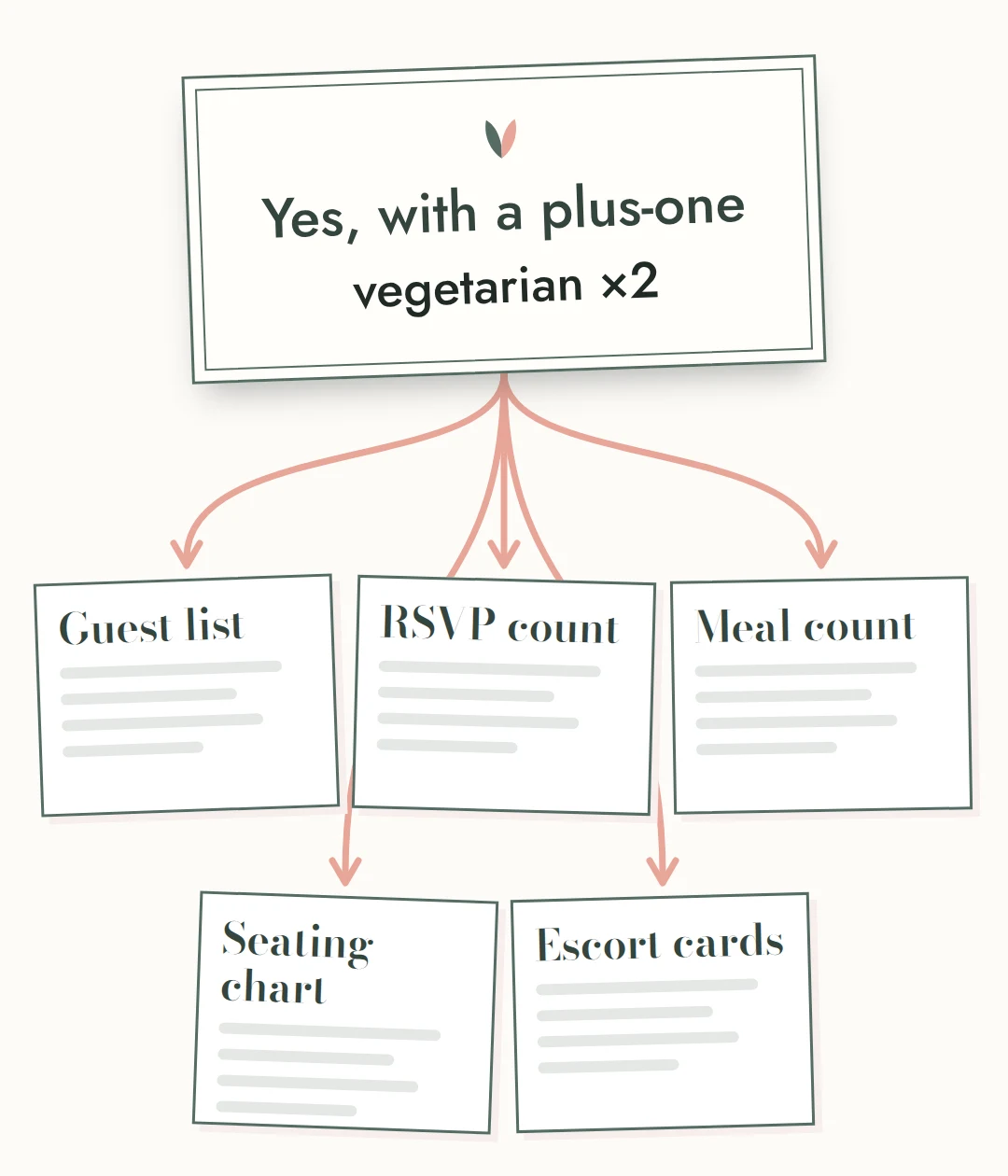
Illustration: one reply card with arrows to five separate lists

Illustration.

After: The Master Guest Record

One guest list runs your RSVPs, meal counts, seating chart and escort cards, so a change in one place shows up everywhere.

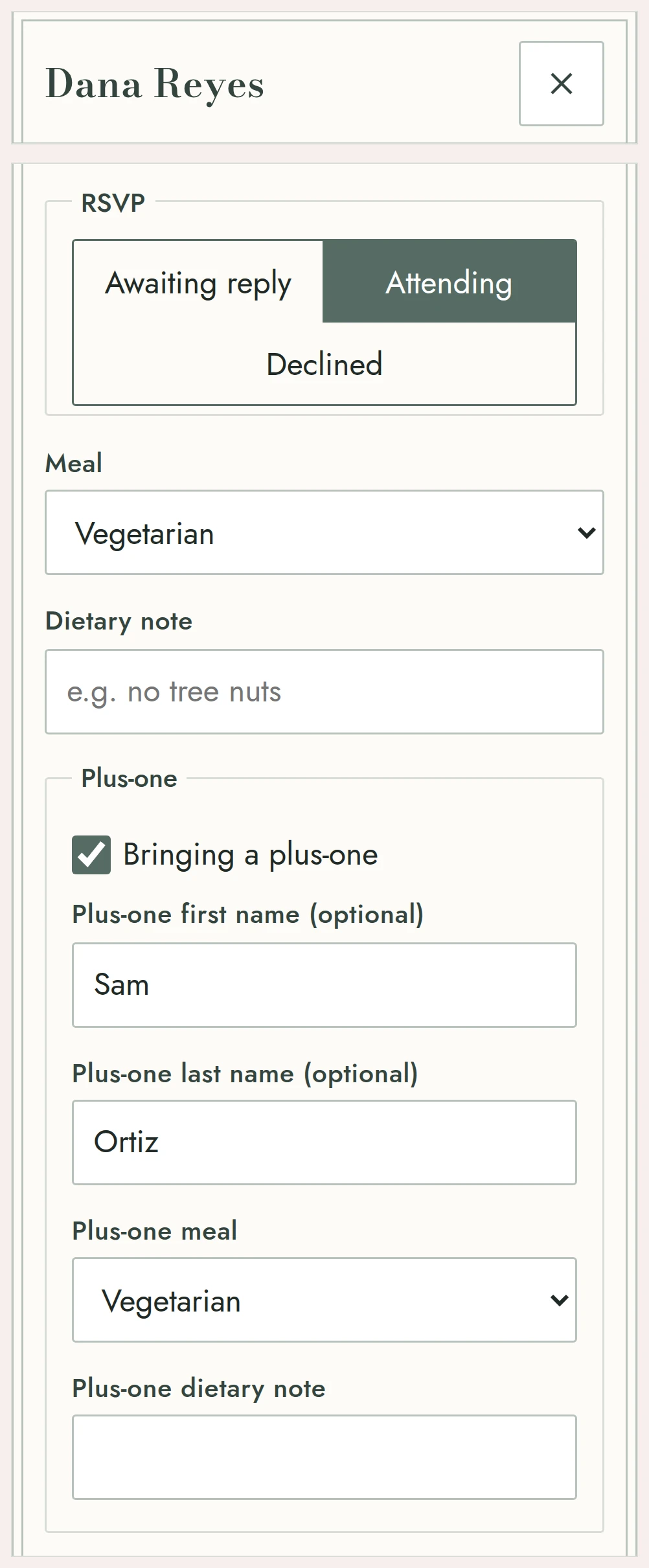
In the planner, Dana has one record: her name, her side, which events she's invited to, her reply, her meal, any dietary note, her plus-one, her mailing address, and later, her gift and whether you've sent the thank-you note. You open that record when her card arrives, mark the reply, add the plus-one and pick two vegetarian plates.

That's the whole edit. Here's what follows it, with nothing typed twice:

The planner with a sample guest record open: reply, meal, plus-one and dietary note
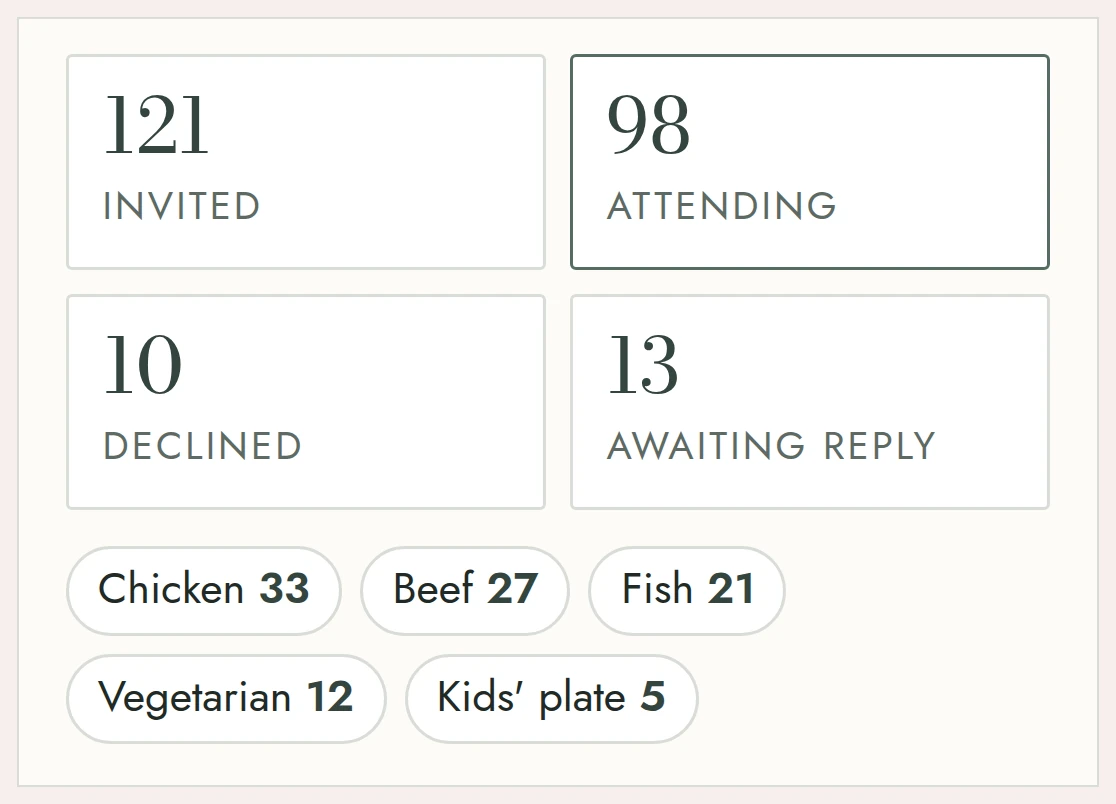
The RSVP and meal totals updating after one sample reply

Screens from the planner, with a sample wedding and made-up guests.

The seating chart that checks your rules

Set up your tables first: round or rectangular, with the number of seats each one holds. Then drag guests into seats.

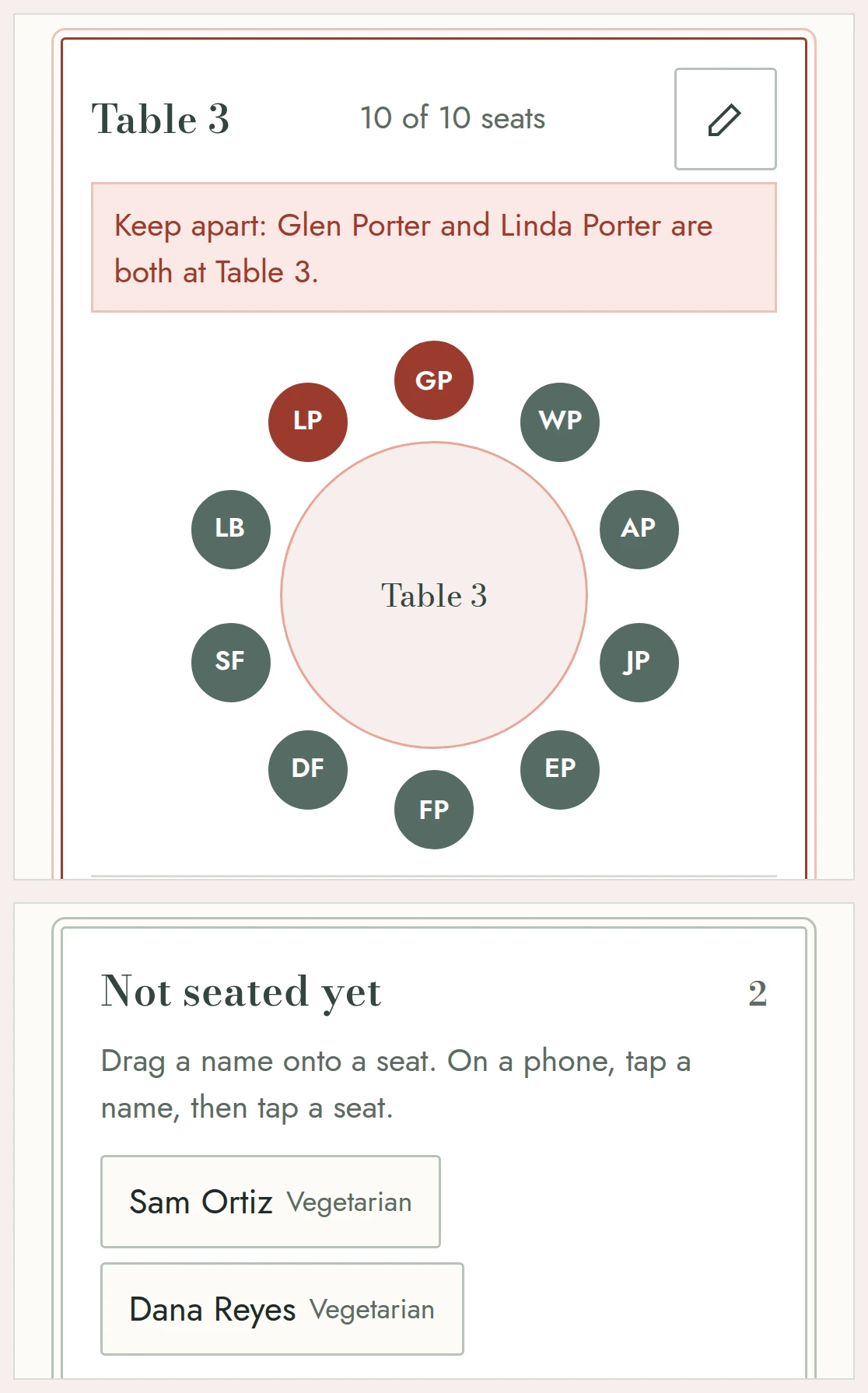
Before you start, tell the planner what you already know. Mark two people keep apart, and if you ever drop them at the same table, the chart warns you right there. Mark a group keep together, and it tells you when one of them ends up somewhere else. A list on the side shows who still needs a seat.

The planner can't make anyone get along. It can keep you from seating them together by accident.

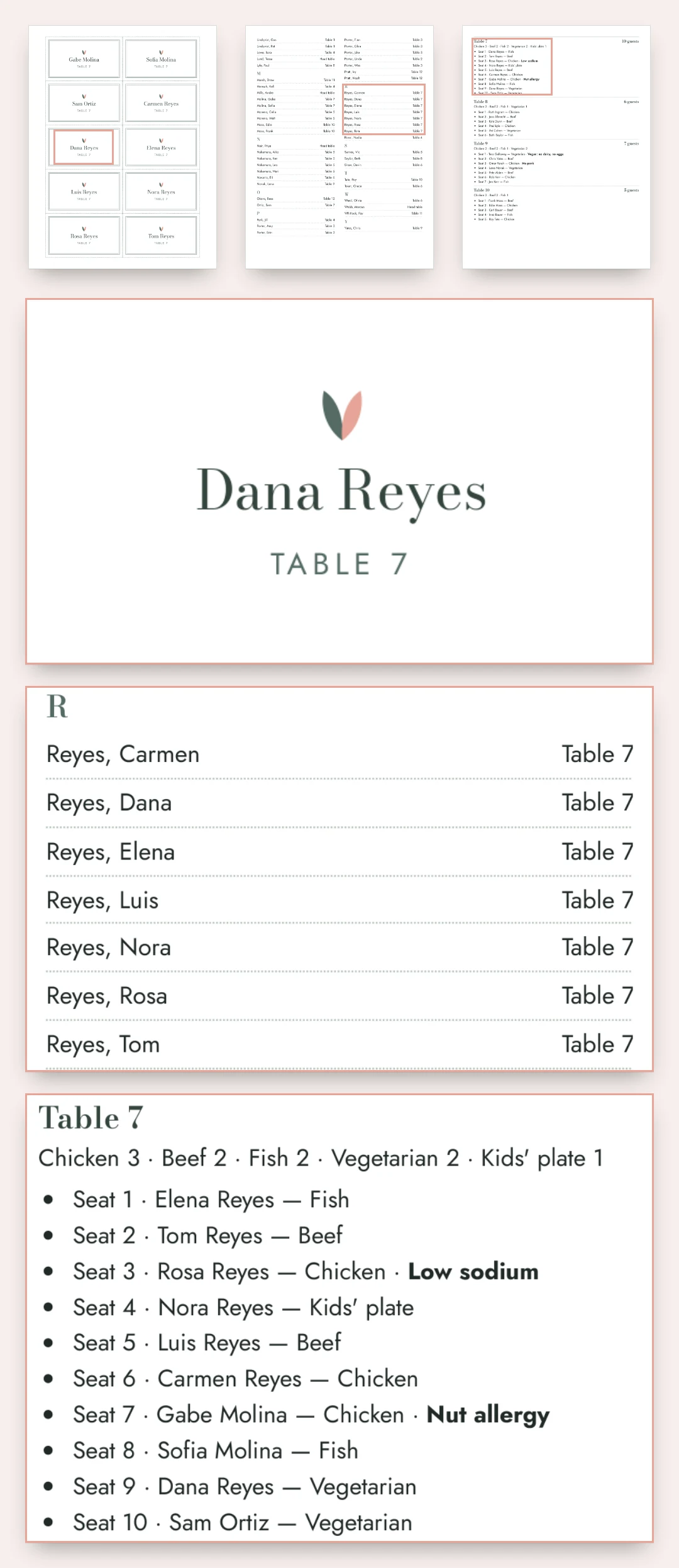
When the chart is done, three things print from it:

The seating chart with a keep-apart warning on one table, sample wedding
A sample escort card, the alphabetical escort list and the caterer sheet, printed on US Letter

Screens and print pages from the planner, sample wedding.

Budget, vendors and the 12-month timeline, next to your guests

The rest of the wedding sits next to your guests, not in another file.

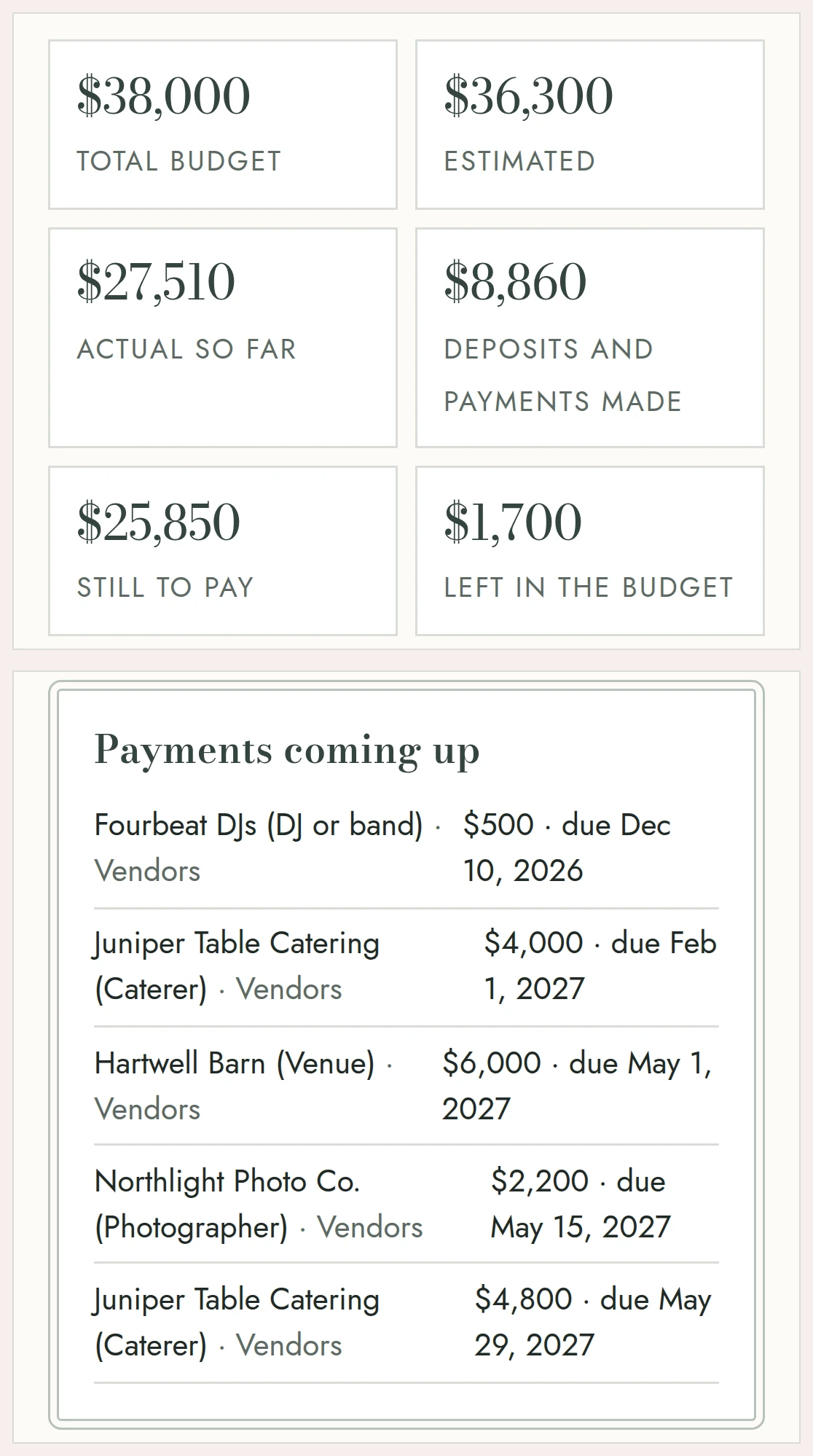
The budget screen with deposits paid, pending payments and due dates, sample wedding
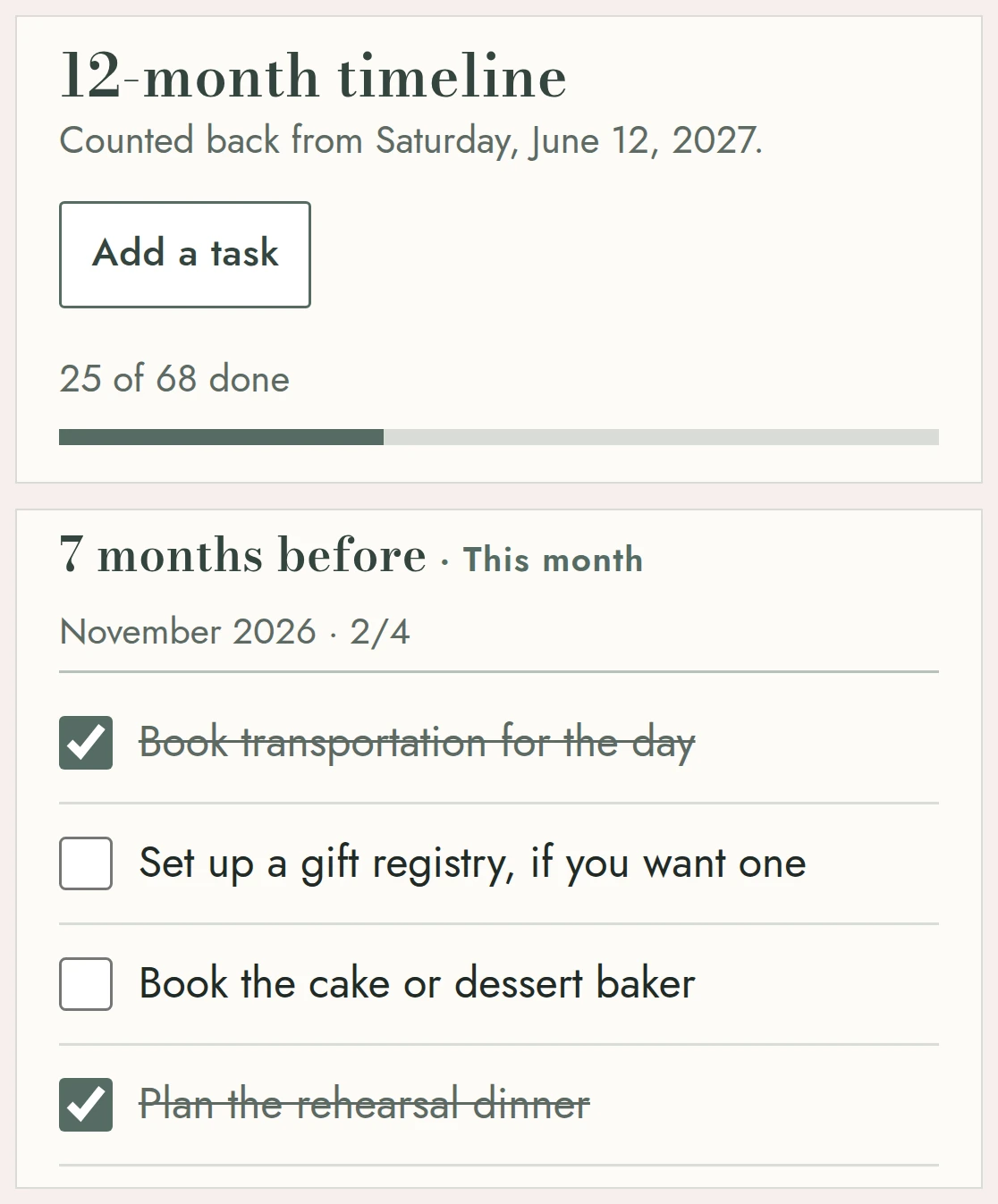
The 12-month timeline counted back from a sample wedding date

Both of you, signed in

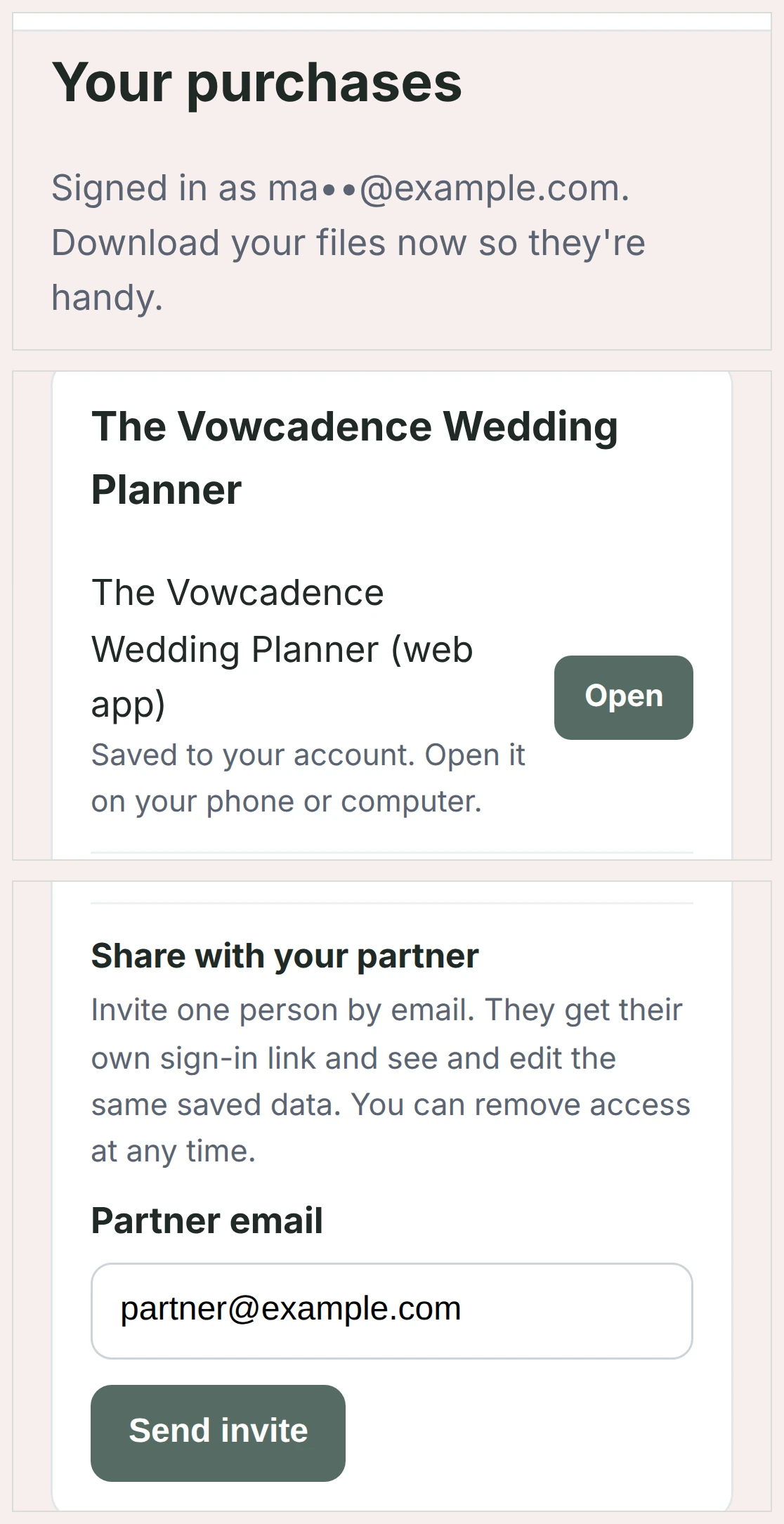
One of you buys. Then, from your access page, you add your partner's email, and they get their own sign-in link. You each sign in on your own phone or computer and open the same planner, and you can both edit it: the same guests, the same chart, the same budget.

One of you can mark the reply that came in by text at lunch, and the other can rework the chart that night, without anyone sending screenshots of a spreadsheet. The planner shows who saved the latest change and when, so you can tell when your partner has been in. Everything is saved to your account, not to one phone.

The access page with the box to share the planner with a partner's email

Free wedding planners, and what the $67 is for

Many free wedding platforms give you a wedding website and a gift registry, and some collect RSVPs online. This planner does none of that, so if those are what you need, a free platform is the place for them.

The useful test for any planner, free or paid, is to follow one reply. Does it reach the meal count by table, the seating chart and the escort cards without being typed again? Does the chart check the people you've marked to keep apart? Does it print the escort cards, the escort list and the caterer sheet? The sections above show all three here, and there are no ads inside.

If your list is short and the seating has no tricky tables, a free planner or a spreadsheet can do the job, and that's a fine choice.

Built from your guest list

Here's what comes with The Vowcadence Wedding Planner:

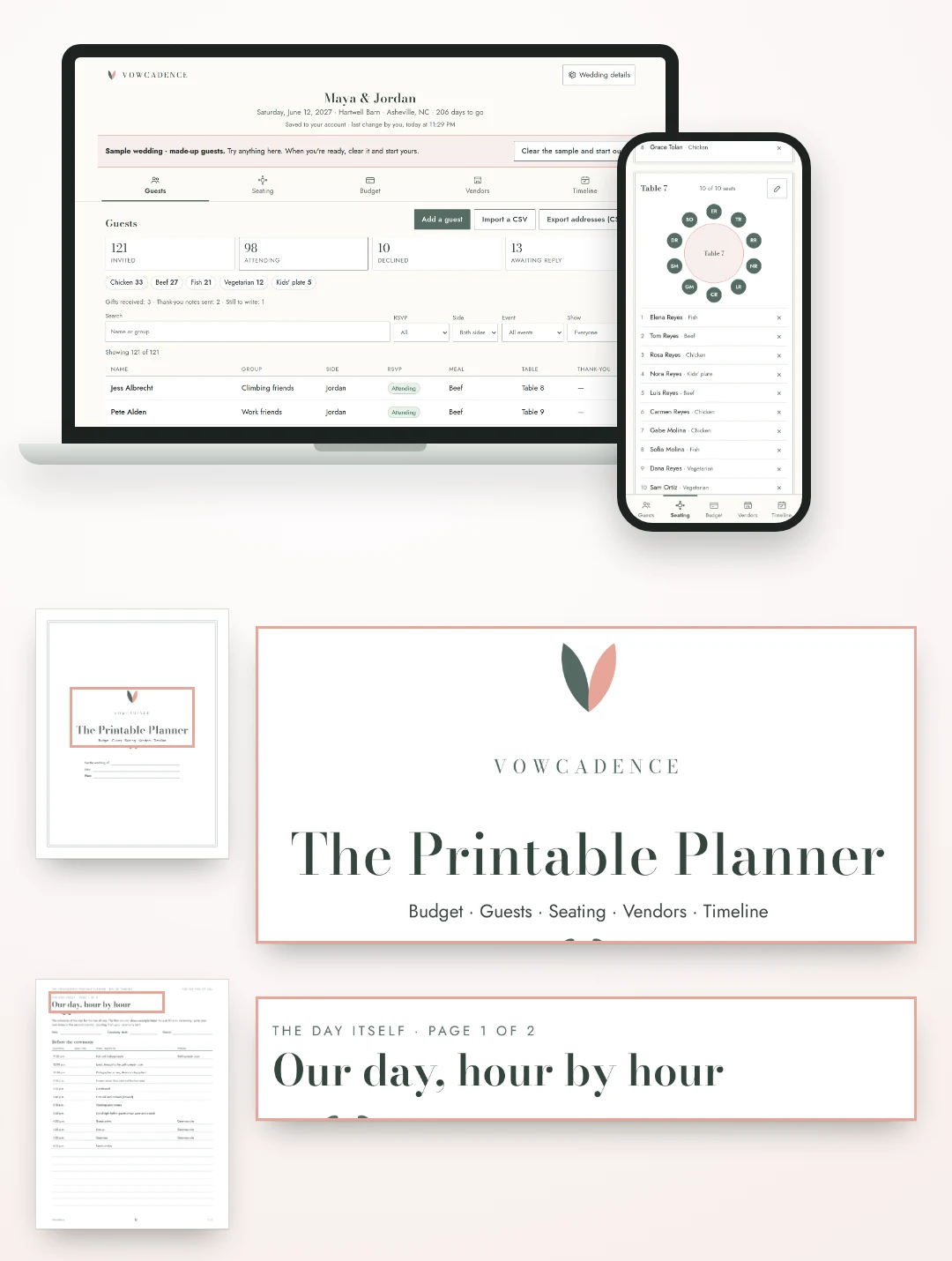
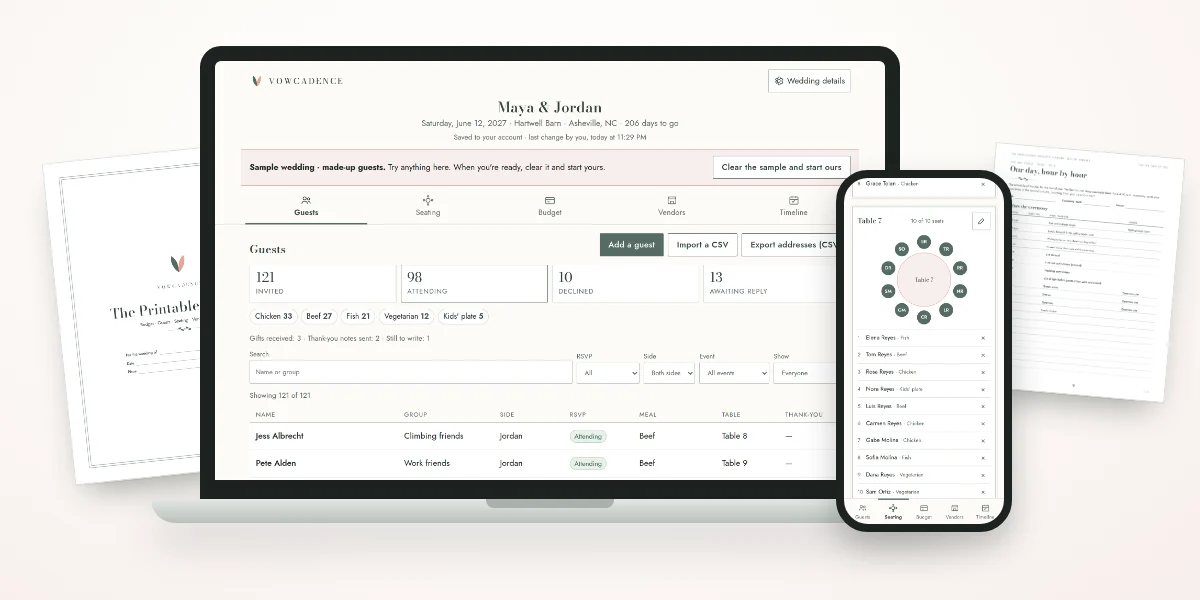
The planner on a phone and a laptop, next to pages from the 90-page PDF and the day-of timeline

Who it's for, and what it doesn't do

It's for couples planning their own wedding, with a date set and a guest list that's starting to come in.

What it doesn't do:

Thirty Days to Say "Not for Us"

Add your guest list and try the seating chart. If it's not for the two of you, one email within 30 days gets you a full refund.

30-Day Money-Back Guarantee. Email [email protected] within 30 days of your purchase and you'll get a full refund of what you paid for that product. You don't have to explain why.

The Vowcadence Wedding Planner

The Vowcadence Wedding Planner on a laptop and a phone, with the 90-page PDF

The Vowcadence Wedding Planner — $67 USD, one-time payment

  • The planner: Guests, Seating, Budget, Vendors and Timeline on one Master Guest Record per guest
  • Escort cards, alphabetical escort list and caterer sheet, printed from your chart
  • Keep-apart and keep-together warnings on the seating chart
  • Partner access with their own email
  • The Printable Planner, 90-page PDF, US Letter
  • Day-of timeline, 2-page PDF
  • Help by email at [email protected]

One-time payment. No ads, no subscription.

Your sign-in link arrives by email right after checkout. 30-Day Money-Back Guarantee.

Every screen here is the planner

The video at the top and each screen on this page come from the planner you'd be using, filled in with a sample wedding and made-up guests. Vowcadence is a new name with no reviews yet, so the screens have to make the case.

Sales and payments are handled by Auryon369 (Fracktal Technologies LLC), the merchant of record, so the charge on your card and any refund go through them. Questions before you buy go to [email protected].

Questions

Do our guests RSVP through the planner?

No. The planner doesn't contact your guests. Replies come in however your invitations ask for them, and you mark each one in the guest's record. From there, the counts, the chart and the cards follow.

Do we have to type in every guest by hand?

You can, or you can import a spreadsheet. Save your list as a CSV file and import it into Guests; then check the columns and fill in what's missing.

Can my partner use it too?

Yes. From your access page, add your partner's email. They sign in with their own link, on their own device, to the same planner, and they can see and edit everything in it. The PDFs and your order stay with you. You share with one partner at a time, and you can stop sharing from your access page whenever you like.

Does it work on a phone?

Yes. The planner opens in the browser on a phone, tablet or computer, and your changes are saved to your account.

Our wedding is big. Will the chart handle it?

Up to 1,000 guests, with the tables to seat them. The seating chart, the counts and the print pages grow with the list.

What paper do the cards and lists print on?

US Letter. The escort cards are laid out to cut from a letter-size sheet.

Can we get our data out?

Yes. You can export your addresses as a CSV file and download a backup of the whole planner at any time.

Is this a subscription?

No. You pay $67 one time, and there are no ads inside the planner.

What if it's not for us?

You have 30 days from your purchase. Email [email protected] and you'll get a full refund.

One record per guest, from the first reply to the last escort card

When the next reply comes in, you change it one time, in one record. The counts, the chart and the cards follow it, and the chart tells you if a rule just broke.

Enter every guest one time, and the seating chart, RSVPs and meal counts take it from there.

P.S. The video at the top shows one reply moving through a sample wedding: the counts, the seating chart and the escort cards. If you buy and the planner isn't for the two of you, email [email protected] within 30 days and you'll get a full refund.